
Anova Oven
Anova Applied Electronics, LLCFood & Drink
3.2305.00 Reviews
- Version
- 1.2.11
- Installs
- 10.00K
- Age Rating
- Everyone
Screenshots
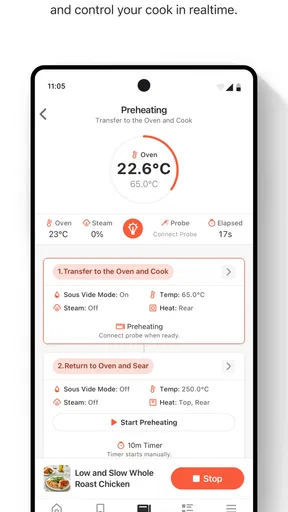
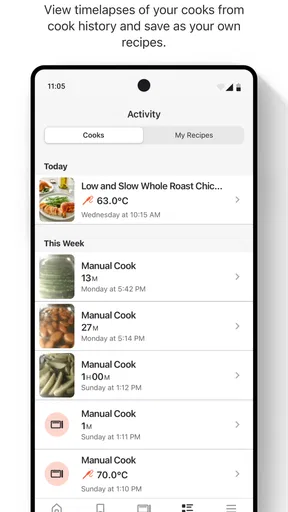
Our Review of Anova Oven
 Analysis by Appyee
When I first open a companion app for a smart oven, I want one thing above all: a clear path from setup to a meal I can actually make. Anova Oven is built around the Anova Precision Oven rather than serving as a general recipe collection, so its usefulness depends on having that appliance. If you do, the app can bring cooking guidance and oven controls together on your phone. If you do not, there is little reason to install it just to browse.
That focus makes the first decision straightforward. This is a free Food & Drink app from Anova Applied Electronics, Inc., with optional in-app purchases priced from $0.99 to $9.99 per item. It is rated for Everyone, and its store audience includes more than 10,000 installs. The average rating is 3.2 from 882 ratings, a mixed reception that makes sense for an app whose experience is tied to a particular kitchen appliance. I would treat it as a practical accessory, not as a standalone cooking solution.
Getting from installation to a useful first cook
I’d make the first session about one small win: get the oven connected, then choose a familiar dish whose steps you can read through before you begin. That way, you can tell whether the app’s guidance fits your routine without also learning a new recipe from scratch. Once that feels comfortable, the next section looks at how to use those instructions thoughtfully and decide what to try next.
What to expect before you begin
The app’s central job is to connect you with the Anova Precision Oven: browse cooking ideas, follow guided instructions, and use your phone to interact with the oven. That is a narrower promise than a broad cooking app makes, but it can be more useful when you are standing in front of this specific appliance and need help deciding what to do next.
Before installing, I would check that the oven is already part of your kitchen and that your phone meets the app’s minimum OS requirement of 8.1. The current version is 1.2.8. Those details are worth checking before you set aside time to pair devices, especially if you are using an older phone. The app is free to download, while optional purchases are separate; I would explore the basic setup and available guidance before deciding whether any purchase is worthwhile.
Initial Setup and Connectivity
Connecting the app to my Anova Precision Oven was as simple as pie (pun intended). The app guided me through the process step-by-step, ensuring even a tech novice could handle it. Once synced, the app offered a plethora of options, from choosing recipes to customizing cooking settings. It felt like the app was eager to get cooking, just as much as I was.
For a first-time user, I would make the pairing step the only task at first: open the app near the oven, follow its on-screen instructions, and confirm that the appliance appears before choosing a recipe. This keeps the first session manageable. If the connection does not seem ready, it is better to pause and complete setup than to select a cooking plan and then wonder whether the phone is communicating with the oven.
One practical trade-off is that a phone-based control path can be convenient, but it also adds a dependency. For a meal where timing matters, I would make sure the oven and app are connected before I start preparing ingredients. That small check avoids turning the cooking stage into a troubleshooting session. I would also keep the oven’s own controls in mind: an app should make the appliance easier to use, not leave you feeling unable to proceed without your phone.
Making the first successful cook less intimidating
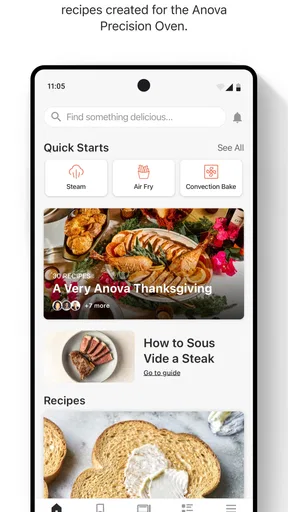
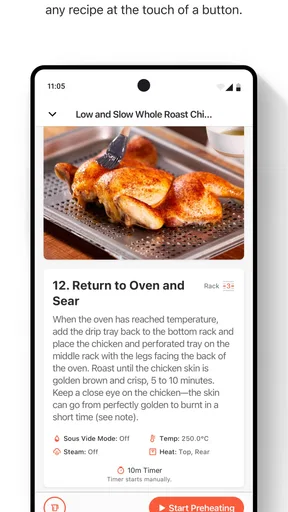
Now, let's dive into the juicy bits—the features! The app offers an impressive array of recipes that cater to all skill levels. Whether you’re a newbie or a seasoned home cook, there’s something for everyone. From perfectly roasted chicken to exquisite soufflés, the options are endless. I particularly enjoyed the guided cooking feature, which walked me through recipes with step-by-step instructions.
For a first attempt, I would choose a dish whose ingredients and prep are familiar, rather than making the app’s most ambitious recipe the test of the connection. Guided steps are most helpful when they let you focus on the oven process instead of juggling an unfamiliar recipe, unfamiliar ingredients, and new controls at once. Read through the instructions before beginning, get the ingredients ready, and then follow the stages in order. That simple workflow gives you a better chance of learning what the app is doing and why.
A useful, less obvious habit is to treat a guided recipe as a repeatable reference, not just a one-time set of directions. If you cook the same food again, note what you liked about the result and whether you would change your preparation next time. The app’s recipe guidance can help organize the process, while your own notes about ingredient size, starting temperature, or preferred doneness help make the second attempt feel more personal. The oven does not remove the cook’s judgement; it gives that judgement a more structured starting point.
Another good first use is choosing a recipe when you have a short window to plan dinner, rather than waiting until you are hungry and rushed. You can look at the available guidance, decide whether the preparation fits the evening, and gather what you need before starting. That is a more realistic benefit than imagining the app will somehow solve dinner without any planning. It is most helpful when it reduces uncertainty about the cooking steps, not when you expect it to do the shopping or prep for you.
Remote controls, timing, and everyday trade-offs
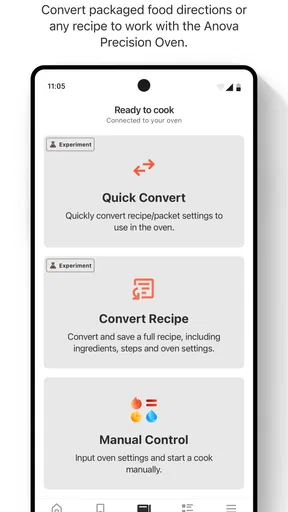
Another standout feature is the app’s ability to control the oven remotely. Imagine being able to start preheating your oven while you're still at the grocery store. It’s the epitome of convenience. Plus, the app allows for precise temperature control, so you can cook your dishes to perfection every time.
I see remote control as a convenience for planned cooking, not a reason to leave a meal unattended or assume every step can be handled from elsewhere. A realistic use is getting the oven ready while you are occupied elsewhere at home, then returning to check the food and continue the recipe. The app can reduce unnecessary trips back and forth, but the cook still needs to make sensible decisions about ingredients, timing, and doneness.
Notifications can also help you keep track of progress when you are doing something nearby, such as setting the table or preparing a side dish. I would treat them as reminders rather than as a substitute for checking the food. A notification is useful when it tells you that a stage needs attention; it does not necessarily tell you whether the dish suits your preferences. That distinction matters most with recipes you have not made before.
Compared with a standard recipe app, the advantage here is the direct relationship to the Anova oven and its cooking controls. A general recipe app can be a better choice if you want broad meal planning, recipes for many appliance types, or an app that remains useful without a specific oven. A printed recipe or ordinary oven controls may be simpler for someone who already knows a dish by heart. The Anova app earns its place when guided oven-specific steps and remote interaction solve a real problem in your routine.
Performance and Usability
In terms of performance, the app is a dream. It runs smoothly without any hiccups, and the real-time notifications keep you informed about your cooking progress. The app’s integration with the oven is seamless, making it feel like an extension of the appliance itself. It's evident that a lot of thought went into ensuring the app complements the oven’s capabilities.
Usability-wise, the app scores high. Navigating through the various sections is intuitive, and the search function is robust, allowing you to find recipes or settings swiftly. I appreciated the little touches, like the ability to save favorite recipes or create a personal cooking profile.
Those conveniences matter most once you have found a few recipes you genuinely plan to repeat. Saving a favorite can reduce the time spent searching on a busy evening, while a personal profile can make the experience feel more tailored than starting from scratch each time. I would build up a small set of dependable choices first. A shortlist of meals that fit your household is more useful in practice than browsing endlessly through recipes you may never cook.
The main limitation is also the app’s defining boundary: it is designed around one oven. If you are comparing it with a general-purpose cooking app, consider how often you will use the oven’s connected guidance and remote controls. Someone who mostly cooks on a stovetop, relies on another oven, or prefers not to use a phone while cooking may find that the app adds little to their routine. Likewise, if you are buying the appliance only because an app sounds impressive, I would judge the oven on its own merits first.
The rating gives prospective users another reason to keep expectations grounded. An average of 3.2 across 882 ratings suggests that experiences are not uniformly positive, even though the app has a substantial base of ratings and reviews. I would not read that as proof that it will fail for a particular user. Instead, I would focus on the parts that matter personally: whether your phone is compatible, whether pairing works in your kitchen, and whether the recipes and controls fit the way you cook.
Choosing whether it belongs in your kitchen routine
In conclusion, the Anova Oven app is more than just a companion to the Anova Precision Oven; it’s a culinary partner that elevates your cooking game. Whether you’re looking to experiment with new recipes or streamline your cooking process, this app has got you covered. It’s like having a personal cooking assistant who never takes a day off.
If you’re someone who loves to cook or wants to enhance their kitchen experience, I’d say give it a try. It’s not just an app; it’s a gateway to culinary adventures, and who wouldn’t want that?
My more measured recommendation is for Anova Precision Oven owners who want a guided route into using the appliance, especially cooks who enjoy trying recipes but appreciate clear steps. It can be a useful bridge between finding an idea and setting up a cook, and its phone controls can make a planned meal feel easier to manage. The first meaningful success does not need to be elaborate: pair the app, choose a familiar recipe, prepare everything before starting, and use the instructions to learn how the oven fits into your process.
I would skip it if you do not own the compatible oven, want a broad recipe library independent of hardware, or rarely use connected controls. For everyone else, the best way to judge it is to try the basic workflow with a meal you already understand. If the guidance saves you effort and you enjoy using it, keep it in your routine; if you prefer the oven’s direct controls or your own recipes, there is no need to force the app into every meal.
Verdict
Strengths of Anova Oven
- Precise temperature control for consistent results.
- User-friendly interface with intuitive design.
- Remote access via app enhances convenience.
- Wide range of cooking presets available.
- Sleek design fits well in modern kitchens.
Limitations of Anova Oven
- Requires stable Wi-Fi for remote features.
- Higher price compared to conventional ovens.
- Limited to Anova ecosystem for some features.
- Initial setup can be time-consuming.
- App notifications can be inconsistent.
Other Releases by Anova Applied Electronics, LLC
View All
Anova Culinary
Food & Drink3.2
Similar Picks in This Category
View All
Rappi: Food Delivery, Grocery
Rappi, Inc - Delivery3.5

McDonald’s: Cupons e Delivery
Arcos Dorados4.3

Swiggy: Food Instamart Dineout
Swiggy4.7

Blinkit: Groceries & more
Blinkit4.8

foodpanda: food & groceries
Foodpanda GmbH a subsidiary of Delivery Hero SE4.0

Zomato: Food Delivery & Dining
Zomato4.7
Frequently Asked Questions
What features does the Anova Oven app offer?
The Anova Oven app provides a comprehensive suite of features designed to enhance your cooking experience. It offers guided cooking recipes, precise temperature control, and real-time monitoring of your dish. The app is user-friendly, allowing you to adjust settings on the fly, and even includes notifications to alert you when your meal is ready.
Is the Anova Oven app compatible with all devices?
The Anova Oven app is compatible with most modern iOS and Android devices. It requires a stable internet connection and Bluetooth capability to pair with the Anova Precision Oven. Before downloading, ensure your device meets the app's software version requirements to avoid compatibility issues.
How does the guided cooking feature work in the Anova Oven app?
Guided cooking in the Anova Oven app is designed to simplify the culinary process. Users can choose from a wide variety of recipes, each with step-by-step instructions. The app automatically adjusts oven settings, such as temperature and steam levels, to ensure optimal results, making it ideal for both beginners and experienced cooks.
What are the pros and cons of using the Anova Oven app?
Pros of the Anova Oven app include its intuitive interface, extensive recipe library, and precise cooking control. However, users may find cons such as occasional connectivity issues or the need for a reliable Wi-Fi connection for full functionality. Despite these minor drawbacks, the app significantly enhances the cooking experience.
Is there a cost associated with using the Anova Oven app?
The Anova Oven app is free to download and use, offering a range of features without any additional cost. However, users should be aware that some advanced features or recipe packs may require in-app purchases. It's best to check the app store for any updates on pricing or special offers.
